

AI-Generated and Deepfake Content Detection Playground
Model Key: hive/ai-generated-and-deepfake-content-detection
Hive's AI-Generated and Deepfake Content Detection API
Hive’s AI-Generated & Deepfake Content Detection API uses deep learning to detect AI-generated visuals, visual deepfakes, and (when present) AI-generated audio.
It can also attribute likely generator models (e.g., Midjourney, Stable Diffusion).
Each category is represented by a model head. Heads contain mutually exclusive classes whose confidence scores sum to 1 (per head).
Our Playground supports image AND video inputs. For videos, Hive splits the input into frames and returns timestamped predictions per frame.
How It Works
When an image or video is submitted, Hive returns an array of classification results. Each result includes a list of classes, each with a class and a model-generated confidence value between 0 and 1.
Example structure:
{
  "output": [
    {
      "extra": [
        { "name": "frame_index", "value": 0 },
        { "name": "timestamp",   "value": 0.0 }  // Always 0.0 for images
      ],
      "classes": [
        { "class": "not_ai_generated", "value": 0.98 },
        { "class": "ai_generated",     "value": 0.02 },

        // AI Generator attribution head (subset shown)
        { "class": "midjourney",       "value": 0.01 },
        { "class": "stablediffusion",  "value": 0.00 },
        { "class": "none",             "value": 0.99 },

        // Deepfake (visual) head
        { "class": "deepfake",         "value": 0.03 },

        // Audio head (if input has audio)
        { "class": "not_ai_generated_audio", "value": 1.0 },
        { "class": "ai_generated_audio",     "value": 0.0 }
	// ai_generated_audio is always 0.0 for images and  videos with no audio
      ]
    }
  ]
}
Note:
inconclusiveandinconclusive_videoare also returned in the classes array, but these are legacy fields and will always have value 0. They are unused.
Quickstart
curl --request POST \
  --url 'https://api.thehive.ai/api/v3/hive/ai-generated-and-deepfake-content-detection' \
  --header 'authorization: Bearer <YOUR_SECRET_KEY>' \
  --header 'Content-Type: application/json' \
  --data '{
    "media_metadata": true,
    "input": [
      { "media_url": "https://i.ibb.co/DHzCRsNk/Screenshot-2025-06-05-at-3-25-40-PM.png" }
    ]
  }'
import requests, json

API_KEY = "<YOUR_SECRET_KEY>"
url = "https://api.thehive.ai/api/v3/hive/ai-generated-and-deepfake-content-detection"

payload = {
  "media_metadata": True,
  "input": [
    { "media_url": "https://i.ibb.co/DHzCRsNk/Screenshot-2025-06-05-at-3-25-40-PM.png" }
    # OR: { "media_base64": "data:<mime>;base64,<BASE64_DATA>" }
  ]
}

res = requests.post(
  url,
  headers={"Authorization": f"Bearer {API_KEY}", "Content-Type": "application/json"},
  data=json.dumps(payload),
  timeout=60
)
print(res.status_code, res.json())
const API_KEY = "<YOUR_SECRET_KEY>";

const res = await fetch(
  "https://api.thehive.ai/api/v3/hive/ai-generated-and-deepfake-content-detection",
  {
    method: "POST",
    headers: {
      "authorization": `Bearer ${API_KEY}`,
      "Content-Type": "application/json",
    },
    body: JSON.stringify({
      media_metadata: true,
      input: [
        { media_url: "https://i.ibb.co/DHzCRsNk/Screenshot-2025-06-05-at-3-25-40-PM.png" }
        // OR: { media_base64: "data:<mime>;base64,<BASE64_DATA>" }
      ],
    }),
  }
);

console.log(await res.json());
Tip: For large files, you can also upload using multipart/form-data with --form 'media=@"/abs/path/file.ext"'.
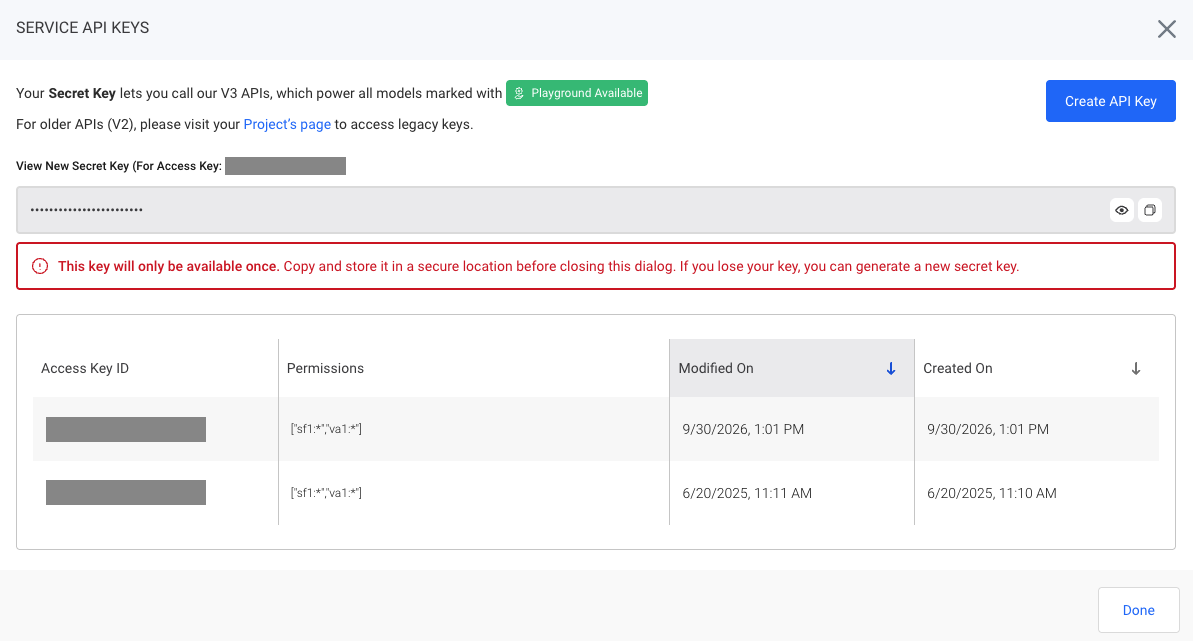
Generate your V3 API Key:
- Click ‘Service API Keys’ in the sidebar.
- Click ‘Create API Key’ to create a new key scoped to your organization. This key can be used with any "Playground Available" model.
⚠️ Important: Keep your API Key secure. Do not share it publicly.
V3 (Playground) vs. V2 (Enterprise)
- V3 (Playground)
- Easiest way to try the model and integrate quickly.
- Default rate limit: 100 requests/day.
- Works with the endpoint used in the examples above.
- V2 (Enterprise Projects)
- For higher rate limits and dedicated stats.
- You’ll receive a project-specific API key and use our V2 task endpoints (sync/async).
- Contact us to enable a V2 Enterprise project!
Once your V2 project is enabled, we’ll provide the exact endpoints and keys inside Projects. Your threshold logic and class names remain the same across V3/V2.
Request Format
To send an image or video to our AI-Generated and Deepfake Content Detection API, make a POST request to the endpoint below. You can pass in a public image, video, or audio URL using the media_url parameter.
Supported Media Types
Image:
.jpg,.png,.webp,.gifVideo:
.mp4,.webm,.m4vAudio:
.mp3,.m4a,.wav
Using media_url or media_base64
curl --location 'https://api.thehive.ai/api/v3/hive/ai-generated-and-deepfake-content-detection' \
--header 'authorization: Bearer <YOUR_SECRET_KEY_HERE>' \
--header 'Content-Type: application/json' \
--data '{
  "input": [
    {
      "media_url": "https://hivemoderation.com/images/31f7d53.png"
      // OR you could use "media_base64": "<your base64 encoding here>"
    }
  ]
}'
| Parameter | Type | Required | Description |
|---|---|---|---|
input | array<object> | ✅ | List of visual inputs to run the model on. Each object must contain a media_url or media_base64 field. Currently, our API only supports passing in 1 input at a time. |
OR
| string | ✅ | Public URL or Base64-encoded media. Size Limits: Video Length Limits: Contact us for higher limits! |
Using Multipart form
For images and videos that are too large for a base64 JSON body, you can send them as a standard multipart/form-data Content Type upload.
curl --location 'https://api.thehive.ai/api/v3/hive/ai-generated-and-deepfake-content-detection' \
--header 'authorization: Bearer <YOUR_SECRET_KEY_HERE>' \
--header 'Content-Type: multipart/form-data' \
--form 'media=@"<absolute path to your file>"'
Response Format
When you submit an image or video, the API returns a JSON object with task metadata and one or more frame-level results.
| Field Name | Type | Description |
|---|---|---|
task_id | string | Unique ID for this request/task. |
model | string | Model name used |
metadata | object | Derived media info and annotations. |
output.extra | array<object> | Extra information about the current frame. Contains frame_index and timestamp (both numbers) to understand where the video is. |
output.classes | array<object> | Class scores for this frame. Each item has a class (label) and a value (confidence). Higher = more confident. |
Class categories you'll see:
- AI-generated authenticity (image/per frame):
ai_generated,not_ai_generated - Deepfake (image/per frame):
deepfake - AI Generator attribution (image/per frame): Many engine labels (e.g.
midjourney,stablediffusion,dalle, etc.) plusother_image_generatorsandnone(no specific generator detected) - Audio authenticity (videos w/ audio, or audio-only inputs):
ai_generated_audio,not_ai_generated_audio- Images and videos w/o audio will default to
ai_generated_audio== 0.
- Images and videos w/o audio will default to
Some practical tips:
- Single Image: Read
output[0].classes
- Use
ai_generatedfor authenticity;deepfakefor face-swap risk.- Video: Iterate on
outputand useframe_index/timestampto aggregate over time.
Thresholds
We recommend the following thresholds for optimized model performance:
- AI-Generated Images:
ai_generated≥ 0.9 - AI-Generated Videos:
ai_generated≥ 0.9 on any frame - Deepfake Image:
deepfake≥ 0.9
Need More Help?
Contact us if you need help getting set up with AI-Generated and Deepfake Content Detection!
Updated about 1 month ago