

Chat Completions (OpenAI-Compatible LLMs)
How to access Hive's self-hosted large language models through the OpenAI-compatible Chat Completions API.
Overview
This is a shared reference for all LLMs served on the /api/v3/chat/completions streaming path. The access mechanics — endpoint, auth, streaming, response shape, billing, errors — are identical across models. The details that vary per model (model key, context window, capabilities) are listed under Available Models.
You can prompt a model with the standard OpenAI chat-completions format and receive a streamed text response. It acts as a provider for coding agent harnesses, or as a drop-in for the OpenAI SDK — point the client at Hive's base URL and use your Hive Secret Key.
- OpenAI-compatible — same request/response shape as OpenAI's
/chat/completions. - Streaming responses — token-by-token SSE output.
Available Models
Try our Playground UI if you'd like to start testing DeepSeek-4.1-Flash-1017 right away!
| Model | Model Key | Context Window | Input Modality |
|---|---|---|---|
| DeepSeek-4.1-Flash-1017 | deepseek-ai/deepseek-v4.1-flash-1017 | 1 million tokens | Text, Image |
| GLM-5.3-Flash | zai-org/glm-5.3-flash | 1 million tokens | Text, Image, Video |
For example requests and responses, refer to each model's individual sub-page.
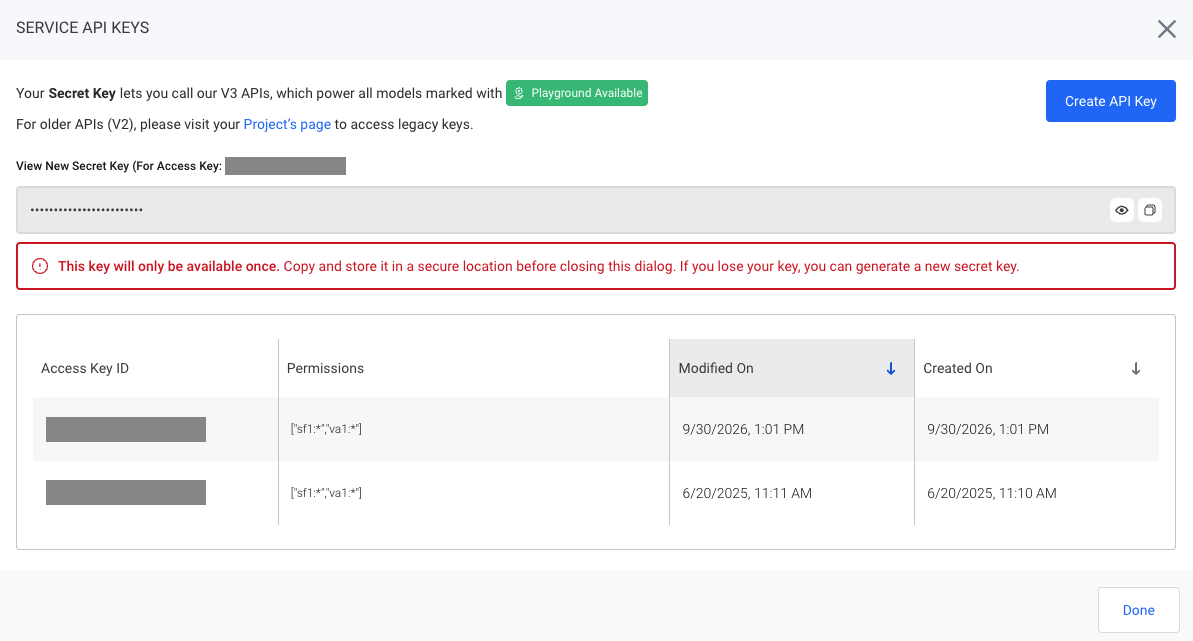
Create Your V3 API Key
- Click ‘Service API Keys’ in the sidebar.
- Click ‘Create API Key’ to create a new key scoped to your organization. This key can be used with any "Playground Available" model.
- Copy the Secret Key and use it as the
Authorization: Bearer <SECRET_KEY>header (the OpenAI SDK'sapi_key).
Coding Agents
Configure your agent harness to use Hive as an OpenAI Compatible model provider. Specify Hive's base URL, the desired model name from Available Models, and your Hive API Key.
General Provider Configuration Details:
| Provider Key | Value |
|---|---|
| API Provider | OpenAI Compatible (Custom) |
| Base URL | https://api-cdn.thehive.ai/api/v3Note: Virginia (VA1) customers should use the URL: https://api-va1.thehive.ai/api/v3/chat/completions |
| Models | Any model key listed under Available Models. |
| API Key | Your API Key from Hive API Key. |
Harness-Specific Configuration Details:
{
  "$schema": "https://opencode.ai/config.json",
  "provider": {
    "hive-ai": {
      "npm": "@ai-sdk/openai-compatible",
      "name": "Hive",
      "options": {
        "baseURL": "https://api-cdn.thehive.ai/api/v3",
        "apiKey": "{YOUR_API_KEY}"
      },
      "models": {
        "deepseek-ai/deepseek-v4.1-flash-1017": {
          "name": "Deepseek 4.1 Flash 1017",
          "modalities": {
            "input": ["text", "image"],
            "output": ["text"]
          }
        }
      }
    }
  }
}
{
"$schema": "https://app.kilo.ai/config.json",
"disabled_providers": [],
"provider": {
"hive-ai": {
"name": "Hive",
"npm": "@ai-sdk/openai-compatible",
"options": {
"baseURL": "https://api-cdn.thehive.ai/api/v3",
"apiKey": "{YOUR_API_KEY}"
},
"models": {
"deepseek-ai/deepseek-v4.1-flash-1017": {
"name": "Deepseek 4.1 Flash 1017",
"reasoning": true,
"modalities": {
"input": [
"text",
"image"
]
}
}
}
}
}
}Tool Calling
Some models support OpenAI-style tool/function calling. When supported, pass tools in the request and read tool-call deltas off choices[0].delta.tool_calls in the stream. Support is per-model — check the capability column in Available Models.
Common Errors
Default rate limit is 5 requests/second. Contact us to request a higher limit.
Too Many Requests (429)
{ "status_code": 429, "message": "Too Many Requests" }Out of Balance (405) — a positive Organization Credit balance is required.
{
  "status_code": 405,
  "message": "Your Organization is currently paused. Please check your account balance, our terms and conditions, or contact [email protected] for more information."
}
Updated 17 days ago