

Image Generation SDXL
stabilityai/sdxl
About
🔑 model key: stabilityai/sdxl
Our hosted image generation models, including SDXL, Flux-Schnell, and others, are state-of-the-art APIs for creating high-quality images from text prompts. Whether you're building creative apps, designing visuals, or testing new ideas, these models provide flexible capabilities to meet your needs.
SDXL is Stability AI's flagship model for artistic image generation, offering versatile and high-quality visuals for creative applications.
How to Get Started
Authentication is required to use these models. You’ll need an API Key, which can be created in the left sidebar.
Follow these steps to generate your key:
- Click ‘API Keys’ in the sidebar.
- Click ‘+’ to create a new key scoped to your organization. The same key can be used with any "Playground available" model.
⚠️ Important: Keep your API Key secure. Do not expose it in client-side environments like browsers or mobile apps.
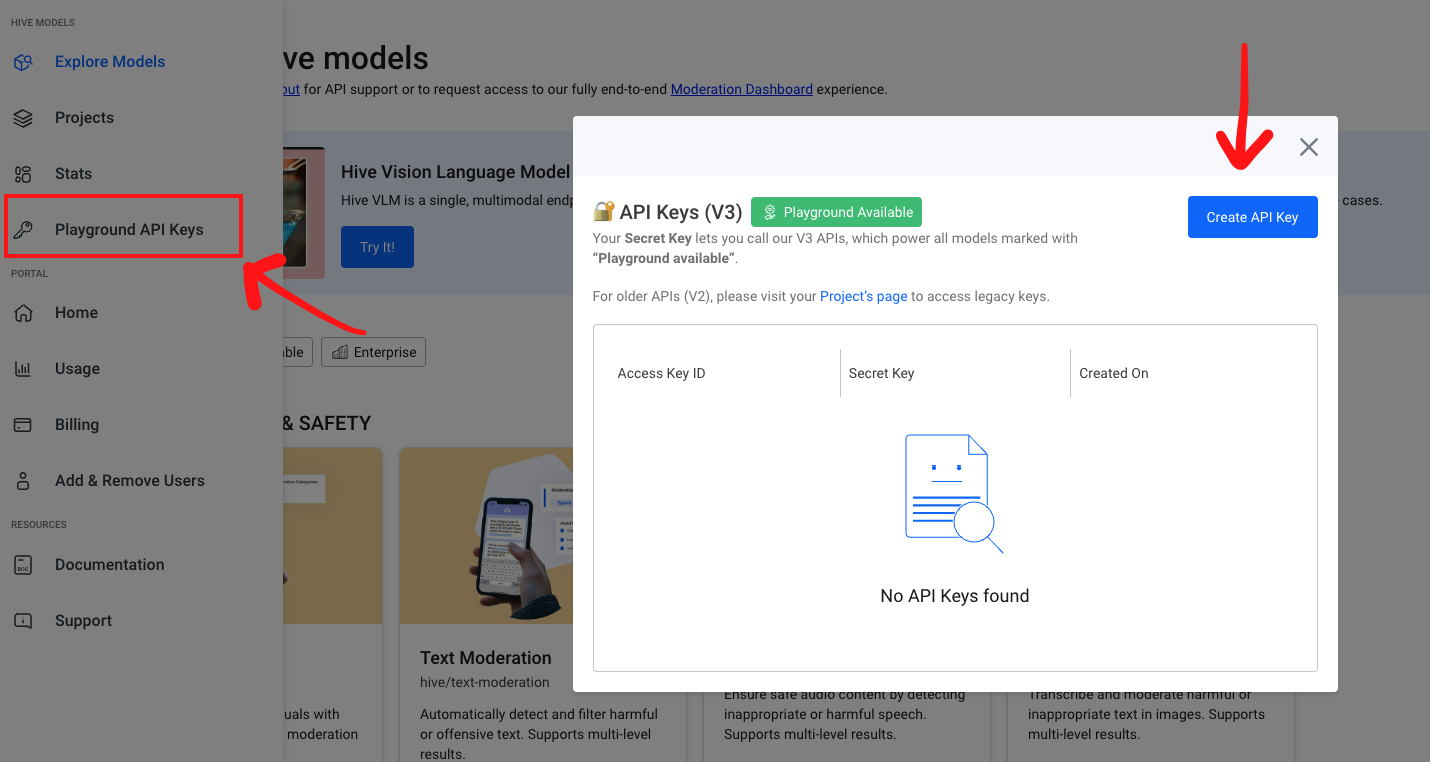
Click '+' to create a new API Key
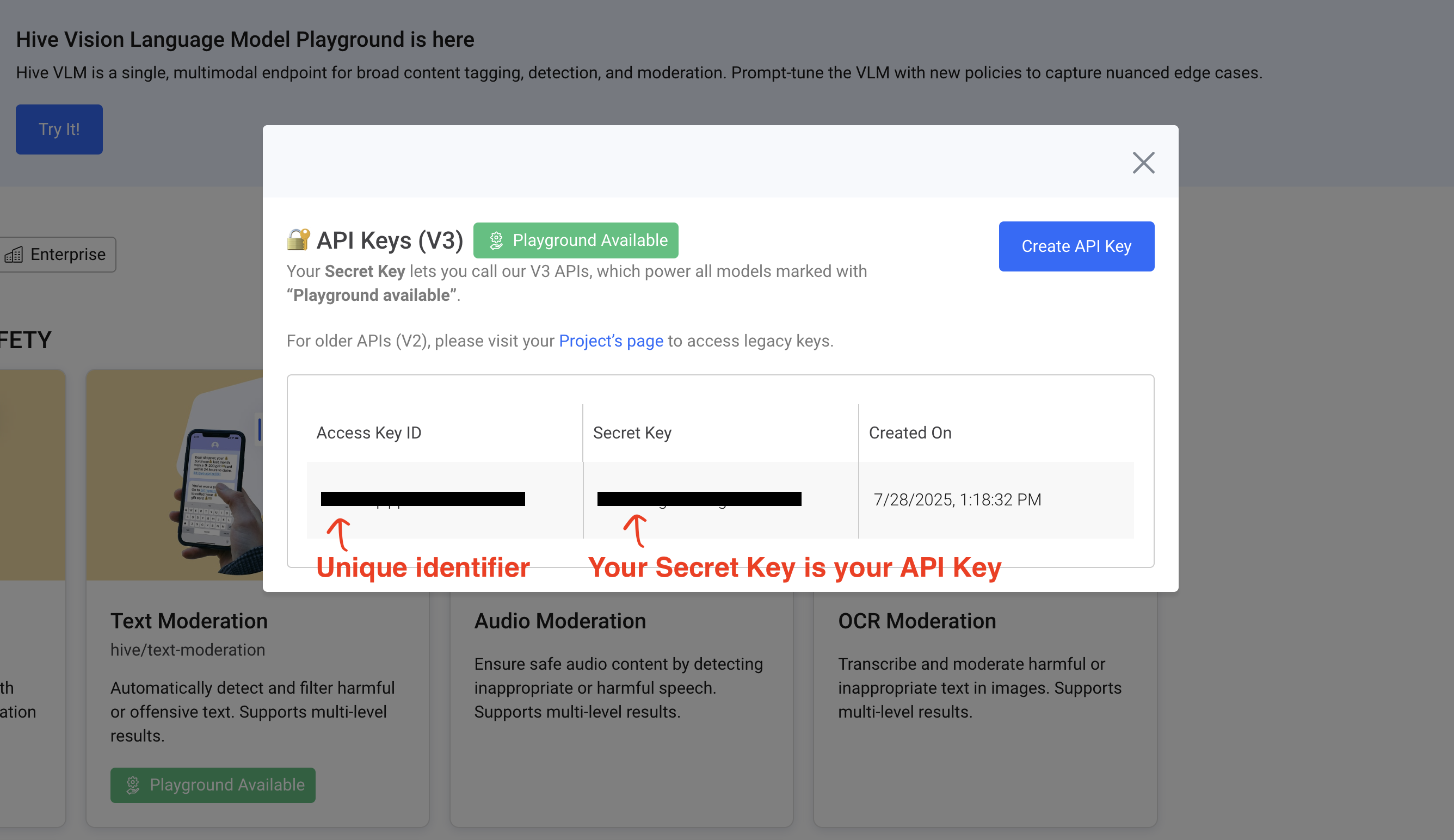
Once you've created an API Key, you can submit API requests using the Secret Key.
Please keep your Secret Key safe.
Making API Requests
Once you have your API Key, you can start making requests to the model’s endpoint with the Authorization header. Here’s a quick example using cURL:
curl --location --request POST 'https://api.thehive.ai/api/v3/stabilityai/sdxl' \
--header 'authorization: Bearer <SECRET_KEY>' \
--header 'Content-Type: application/json' \
--data '{
  "input": {
    "prompt": "Nestled within the depths of an enchanted forest, a wooden bridge serves as a pathway lined with glowing lanterns, casting a warm, golden light across its surface. Surrounded by dense trees, the bridge is carpeted with fallen leaves, adding to the mystical ambiance of the setting. The air seems filled with a magical mist, enhancing the dreamlike quality of the forest, inviting onlookers into a tranquil, otherworldly journey.",
    "negative_prompt": "blurry",
    "image_size": { "width": 1024, "height": 1024},
    "num_inference_steps": 15,
    "guidance_scale": 3.5,
    "num_images": 2,
    "seed": 67,
    "output_format": "jpeg",
    "output_quality": 90
  }
}'
const request = require('request');
const options = {
'method': 'POST',
'url': 'https://api.thehive.ai/api/v3/stabilityai/sdxl',
'headers': {
'accept': 'application/json',
'authorization': 'Bearer <TOKEN>',
'Content-Type': 'application/json',
},
body: JSON.stringify({
"input": {
"prompt": "Nestled within the depths of an enchanted forest, a wooden bridge serves as a pathway lined with glowing lanterns, casting a warm, golden light across its surface. Surrounded by dense trees, the bridge is carpeted with fallen leaves, adding to the mystical ambiance of the setting. The air seems filled with a magical mist, enhancing the dreamlike quality of the forest, inviting onlookers into a tranquil, otherworldly journey.",
// The following prompts are optional
"negative_prompt": "realistic",
"image_size": {"width": 1024, "height": 1024},
"guidance_scale": 5,
"num_images": 4,
"seed": 1234,
"output_format": "png",
},
}),
};
request(options, (error, response) => {
if (error) throw new Error(error);
console.log(response.body);
});import requests
headers = {
'authorization': 'Bearer <API_KEY>',
'Content-Type': 'application/json',
}
json_data = {
'input': {
'prompt': 'Nestled within the depths of an enchanted forest, a wooden bridge serves as a pathway lined with glowing lanterns, casting a warm, golden light across its surface. Surrounded by dense trees, the bridge is carpeted with fallen leaves, adding to the mystical ambiance of the setting. The air seems filled with a magical mist, enhancing the dreamlike quality of the forest, inviting onlookers into a tranquil, otherworldly journey.',
'negative_prompt': 'blurry',
'image_size': { 'width': 1024, 'height': 1024},
'num_inference_steps': 15,
'guidance_scale': 3.5,
'num_images': 1,
'seed': 67,
'output_format': 'png'
}
}
response = requests.post('https://api.thehive.ai/api/v3/stabilityai/sdxl', headers=headers, json=json_data)
print(response)import java.net.URI;
import java.net.http.HttpClient;
import java.net.http.HttpRequest;
import java.net.http.HttpResponse;
import java.time.Duration;
import org.json.JSONObject;
import java.util.Map;
import java.util.HashMap;
public class StabilityAiClient {
private static final String API_URL = "https://api.thehive.ai/api/v3/stabilityai/sdxl";
private final String apiToken;
private final HttpClient client;
public StabilityAiClient(String apiToken) {
this.apiToken = apiToken;
this.client = HttpClient.newBuilder()
.connectTimeout(Duration.ofSeconds(30))
.build();
}
public void generateImage(String prompt) {
try {
Map<String, Integer> imageSize = new HashMap<>();
imageSize.put("width", 1024);
imageSize.put("height", 1024);
JSONObject imageSizeObj = new JSONObject(imageSize);
// Create the input object
JSONObject input = new JSONObject()
.put("prompt", prompt)
// The following prompts are optional
.put("negative_prompt", "realistic")
.put("image_size", imageSizeObj)
.put("guidance_scale", 5)
.put("num_images", 4)
.put("seed", 1234)
.put("output_format", "png");
// Create the main request body
JSONObject requestBody = new JSONObject()
.put("input", input);
// Build the HTTP request
HttpRequest request = HttpRequest.newBuilder()
.uri(URI.create(API_URL))
.header("accept", "application/json")
.header("authorization", "Bearer " + apiToken)
.header("Content-Type", "application/json")
.POST(HttpRequest.BodyPublishers.ofString(requestBody.toString()))
.build();
// Send the request and get the response
HttpResponse<String> response = client.send(request,
HttpResponse.BodyHandlers.ofString());
// Print the response
System.out.println(response.body());
} catch (Exception e) {
System.err.println("Error generating image: " + e.getMessage());
e.printStackTrace();
}
}
// Example usage
public static void main(String[] args) {
String token = "<TOKEN>";
StabilityAiClient client = new StabilityAiClient(token);
client.generateImage("Nestled within the depths of an enchanted forest, a wooden bridge serves as a pathway lined with glowing lanterns, casting a warm, golden light across its surface. Surrounded by dense trees, the bridge is carpeted with fallen leaves, adding to the mystical ambiance of the setting. The air seems filled with a magical mist, enhancing the dreamlike quality of the forest, inviting onlookers into a tranquil, otherworldly journey.");
}
}After making a request, you’ll receive a JSON response with the generated images as URLs. Here’s a sample output:
{
  "id": "<task_id>",
  "model": "<model_name>",
  "version": "1",
  "input": {
    "prompt": "Nestled within the depths of an enchanted forest, a wooden bridge serves as a pathway lined with glowing lanterns, casting a warm, golden light across its surface. Surrounded by dense trees, the bridge is carpeted with fallen leaves, adding to the mystical ambiance of the setting. The air seems filled with a magical mist, enhancing the dreamlike quality of the forest, inviting onlookers into a tranquil, otherworldly journey.",
    "negative_prompt": "blurry",
    "image_size": { "width": 1024, "height": 1024},
    "num_inference_steps": 15,
    "guidance_scale": 3.5,
    "num_images": 2,
    "seed": 67,
    "output_format": "jpeg",
    "output_quality": 90,
  },
  "output": [
    {
      "url": "https://..."
    },
    {
      "url": "https://..."
    }
  ]
}
Schema
Below are the definitions of possible relevant input and output fields. Some fields have default values that will be assigned if the user does not assign a value themselves.
Input
Field | Type | Definition |
|---|---|---|
prompt | string |
|
negative_prompt | string | Text prompt where the user can detail aspects that should not be included in the generated image. |
image_size | object | Possible dimensions for a generated image. The object "size" contains the attributes "width" and "height" defined below. In terms of (width, height), the default dimensions are (1024, 1024). The full possible list of sizes is: (1344, 768), (1280, 960), (960, 1280), (768, 1344), and (1024, 1024). |
width | int | The width of the generated image. Attribute of "image_size" object. |
height | int | The height of the generated image. Attribute of "image_size" object. |
num_inference_steps | int | The amount of steps for inference (how many times the image passes through the model). The default value is 20, with a range of 1 to 60, inclusive. |
guidance_scale | float | Measures how much influence the prompt has during the image generation process. The default value is 5, with a range of 2 to 12, inclusive. |
num_images | int | The number of images to generate per request. The default value is 2, with a range of 1 to 6, inclusive. |
seed | int | A random number assigned during the generation process to ensure that results are reproducible. If you generate multiple images with the same prompt and same seed, you will receive the same results. The default value is -1 (random value), with a range of 0 to 2147483647, inclusive. |
output_format | string | The file type of the generated image. Current possible file types include: png, jpeg. |
output_quality | int | Input field only used when generating jpeg images, as they are lossy. The default value is 80, with a range of 1 to 100, inclusive. With a value of 100, the resulting image is not lossy. To store the image at a smaller file size, lower this value. |
Output
| Field | Type | Definition |
|---|---|---|
| id | string | The ID of the submitted task. |
| model | string | The name of the model used. |
| version | string | The model version used. |
| input | object | The input parameters received from the user. Any default values used are also included. |
| output | array of objects | The output from the model. Contains an array of objects containing the image URL. |
| url | string | Within the “output” attribute, this contains the url to the newly-generated image. |
Content Moderation
Our image generation models include automatic content moderation to ensure safe and responsible use. Moderation is enabled by default and works across two stages:
- Text Moderation
- Every prompt is first evaluated by our Text Moderation model model. If the prompt violates our content policies, the generation request is blocked before any image is produced.
- Visual Moderation
- If the prompt passes, the resulting image is then reviewed by our Visual Moderation model model. If the image contains restricted content, it is blocked from being displayed or returned to the user.
Moderation covers a wide range of potentially harmful or sensitive categories, including:
- NSFW content, violence, drugs, hate, gore, and child safety
- PII, profanity, spam, gibberish, and deceptive promotions
- Celebrity likeness, characters, and other IP-related content
- Support for multiple languages and obfuscated or disguised inputs
These filters run automatically on both the input prompt and the generated image to reduce the risk of harmful content making it through.
If either filter rejects the generation request, no charges will apply. You’ll receive an error message explaining the moderation status, allowing you to adjust and try again.
If your application requires customized moderation logic or threshold tuning, feel free to contact us to explore tailored solutions.
{
  "status_code": 451,
  "message": "Images did not pass moderation filters."
}
Common Errors
Each model has a default starting rate limit of 5 requests per second. You may see this error below if you submit higher than the rate limit.
To request a higher rate limit please contact [email protected].
{
  "status_code": 429,
  "message": "Too Many Requests"
}
A positive Organization Credit balance is required to continue using Hive Models. Once you run out of credits requests will fail with the following error.
{
  "status_code":405,
  "message":"Your Organization is currently paused. Please check your account balance, our terms and conditions, or contact [email protected] for more information."
}